01 / CREATIVITY
Design & Creation
Digital drawing, illustration, 3D modelling, desktop publishing, interior design and visual content creation.



Explore a curated selection of free applications for Windows. Create music, edit photos, design projects, organise documents, protect your files and discover practical tools for work, learning and creativity.
Full-featured software from independent projects, brought together in one easy-to-explore collection. No mandatory subscriptions to use the applications featured here.
From everyday tasks to creative projects, discover applications you can install on your computer and use at your own pace. Each program has its own product page with details about its features, system requirements and download options.
Digital drawing, illustration, 3D modelling, desktop publishing, interior design and visual content creation.
Music production, DJ mixing, audio editing, composition, recording and learning musical instruments.
Photo management and editing, video production, media conversion and audiovisual creation.
Document scanning, PDF management, digital libraries, note-taking, planning and information organisation.
Backups, file synchronisation, password management, file organisation and computer maintenance tools.
Astronomy, simulation, technical drawing, chess and applications for exploring new skills and interests.
Many professional and creative applications are available to use free of charge, including for personal and professional projects, subject to the terms of each software licence.
Practical software designed for ongoing use, with real capabilities and useful features. Available functionality varies by application.
From straightforward tools for everyday tasks to advanced applications for experienced users and professionals.
Discover alternatives to commercial software and choose the tools that best suit your needs and projects.
This collection focuses on applications that can be used free of charge on an ongoing basis. It is not a catalogue of trials with expiry dates. Specific usage terms are detailed on each product page and in the relevant licences.
We aim to make it easier to discover useful tools for your computer.
Browse the available applications and discover what each one can do.
Review key features, Windows requirements, available languages, developer information and licensing conditions.
Use the download option on the product page. Depending on the application, the file may be hosted by Elegia Studio or provided through the official project website.
Freelancers · Small Businesses · Content Creators · Designers · Musicians · Students · Teachers · Families · Technology Enthusiasts · Windows Users
Whether you need a practical tool for work, want to develop a personal project or simply enjoy learning something new, you can explore useful applications without any purchase commitment.
Explore the applications in this collection, discover their features and choose the tools that work best for you. Available software can be found in the product listing on this page.
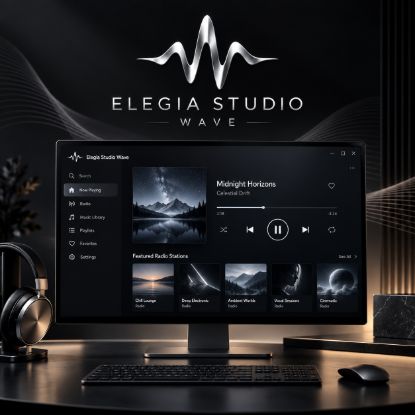
Turn your computer into a complete music entertainment centre with Elegia Studio Wave. Discover radio stations from around the world, listen to your CDs and music files, organise playlists and favourites, and personalise your listening experience with built-in audio tools.
With its modern, elegant interface, Elegia Studio Wave brings together different ways to enjoy and explore music in a single Windows application.
Download for free and enjoy a 15-day trial. After the trial period, you can purchase a license key to continue using the application.